How to Use and Troubleshoot the LCI Titan Jack System (BaseCamp Leveling System)
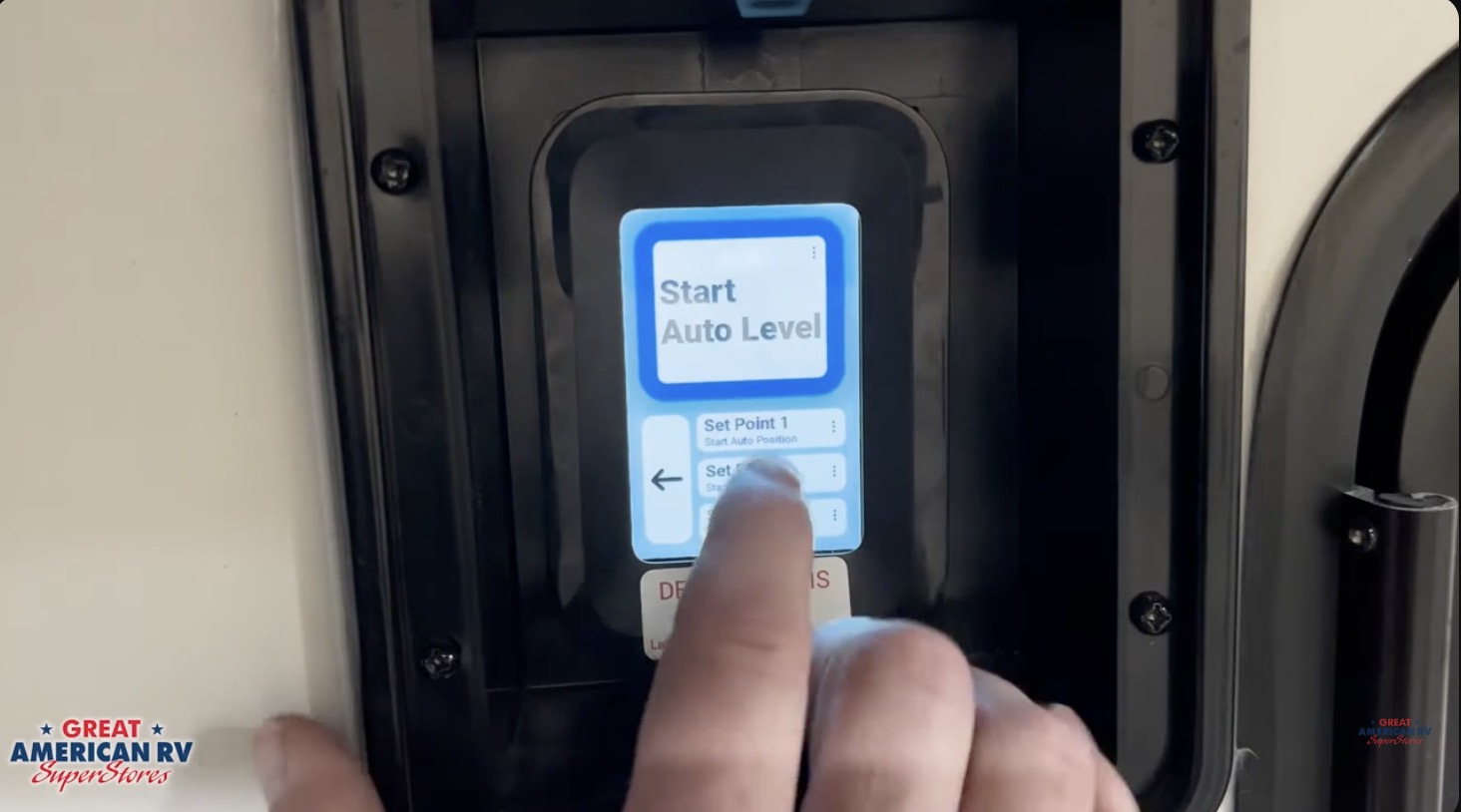
The LCI Titan Jack System, also known as the BaseCamp Leveling System, represents Lippert’s latest touchscreen-controlled hydraulic leveling platform. Designed for motorhomes, fifth wheels, and larger travel trailers, it offers factory auto-leveling, custom set points for specific slopes, hitch height recall, full manual control, Bluetooth integration via the Lippert OneControl app, and advanced safety interlocks. Whether you’re leveling for overnight camping, setting a slight nose-down pitch for rain runoff, or pitching forward to drain tanks easily, the Titan system gives precise control over every jack with minimal effort.
This comprehensive guide walks through every aspect of operation: initial setup, touchscreen navigation, auto and manual leveling, hitch height memory, custom set points, retract procedures, zero point calibration, Bluetooth app setup, error handling, hydraulic fluid checks, electrical troubleshooting, preventive maintenance, safety best practices, and an expanded FAQ section based on real 2026 owner experiences. Mastering these steps ensures your RV levels quickly, stays stable, and avoids common frustrations like “excessive slope” errors or incomplete retracts.
At Great American RV SuperStores, we see the Titan system on more new deliveries every year. It’s user-friendly once you understand the touchscreen flow, safety requirements, and occasional recalibration needs. Most “problems” are low battery voltage, interrupted auto cycles, or skipped orientation steps — all easily preventable.
Hey Happy Campers! Todd here with Great American RV SuperStores.
Today we’re going in-depth on how to operate, calibrate, and troubleshoot your LCI Titan Jack System (BaseCamp Leveling System) — from waking the touchscreen and entering the default PIN to running auto level, saving custom set points, recalling hitch height, using Bluetooth via the OneControl app, recalibrating zero point, checking hydraulic fluid, diagnosing electrical issues, avoiding common errors, performing routine maintenance, and answering the questions owners ask us most often.
If you’d prefer a step-by-step visual demo, check out the full walkthrough on the Great American RV YouTube channel in our Hap’s Helpful Hacks playlist.
Let’s get your RV level, stable, and ready for every adventure!
System Overview: Key Components and Safety Requirements
The LCI Titan system uses hydraulic fluid pressure to power four or six jacks (front landing gear and rear/mid stabilizers), controlled by a central pump/reservoir and touchscreen interface. Major components:
- Hydraulic Pump & Reservoir — Typically in a front or side compartment; holds fluid and houses the pump motor.
- Jacks — Electric-over-hydraulic cylinders; front pair handles landing gear, rear pair (or more) stabilizes the back.
- Touchscreen Control Panel — Main interface; shows battery voltage, jack status, slope readings, and menu options.
- Control Module — Processes inputs from touchscreen, sensors, and safety interlocks.
- Level Sensor — Internal pitch/roll sensor for auto leveling.
- Bluetooth Module — Enables app control via Lippert OneControl.
Power is drawn from the RV’s 12-volt house batteries. The pump requires strong voltage (minimum ~10.7V under load) — low power is the #1 cause of errors and failed cycles.
Critical Safety Requirements (LCI Official) Before any operation:
- Parking brake must be engaged.
- Transmission must be in PARK.
- RV on reasonably stable, level ground — avoid extreme slopes or loose surfaces.
- Never lift RV so wheels come completely off the ground — destabilizes the rig.
- Do not level with slides extended — weight shift can cause tipping or jack overload.
- Ignition must be off — system interlock prevents operation if engine running.
- Ensure proper 12V voltage — below 10.7V triggers automatic shutdown.
Accessing Manuals, QR Code Help, and Override Instructions
At the bottom of the touchscreen, tap the question mark (?) icon. A QR code appears — scan with your phone. This opens Lippert’s official resources:
- Full system manuals
- Troubleshooting guides and error code explanations
- Maintenance schedules
- Manual override procedures (crank access for power failure)
Save the link on your phone — it’s your quick reference for any issue.
Unlocking and Entering the Titan System
- Tap the screen to wake it.
- Enter default PIN: 5241
- Press the green checkmark.
Home screen options vary by last mode used, but common icons include Auto Level, Manual Mode, Hitch Height, Arrival/Departure, Custom Set Points (1–4), and Lighting Controls.
Landing Gear Controls (Front Jacks Only)
From the main menu:
- Extend Landing Gear — Hold to drop front jacks (move together).
- Retract Landing Gear — Hold to raise them.
Rear and mid jacks are controlled separately in manual mode or during auto level.
Auto Leveling: Factory Preset
After parking and disconnecting:
- Stabilize front: Extend landing gear until weight is off hitch; pull tow vehicle away.
- Tap Auto Level (factory zero point).
- Confirm prompt.
- Step away — do not enter RV, open slides, or move inside during cycle (1–5 minutes).
- Completion — pump stops, display confirms level.
The system scans pitch/roll, then adjusts each jack individually to match the saved factory zero point.
Manual Leveling: Fine-Tune Control
- Tap Manual Mode.
- Use directional arrows to extend/retract individual jacks.
- Monitor Current Level display (degrees front/back, left/right).
- Goal: zero degrees both axes — use 4-ft level inside RV for verification.
- Retract: Use All Retract or individual buttons.
Manual mode is perfect for tweaking after auto or creating custom set points.
Custom Set Points (Options 1–4)
Titan lets you store up to four custom leveling positions:
- Slight nose-down for rain runoff
- Forward pitch for tank dumping
- Favorite campsite slope
- Storage position
To save:
- Select Set Point 1, 2, 3, or 4.
- Tap three dots → Change.
- Manually adjust jacks to desired position.
- Tap Set to store.
Safety note: Titan will not save if slope exceeds ~5 degrees.
To use:
- Select desired set point.
- Accept warning prompt.
- System adjusts to stored position.
Departure / Hitch Height Mode
Titan automatically records jack positions when you unhook. To return:
- Tap Departure Mode → Return to Hitch Height.
- Jacks adjust to exact disconnect height.
- Once hitched, tap Retract All.
Bluetooth Setup Through the Lippert OneControl App
- Locate OneControl box (front compartment) and QR code/password sticker.
- Download Lippert OneControl app (iOS/Android).
- Tap + → RV Connections → Scan with Camera.
- Scan QR code, enter password.
- Select Year, Make, Model, enter VIN.
- Connect via Bluetooth.
App mirrors touchscreen:
- Auto Level
- Custom set points
- Manual control
- Hitch height
- Voltage monitoring
- Jack lights
- Slide controls (if equipped)
Changing the PIN Code
Top right → Settings → PIN Enter new PIN twice to save.
Error Handling: Common Messages and Fixes
Titan stops automatically on faults:
- Leveling Error — RV too far out of level or max jack stroke reached. Add blocks or reposition.
- Insufficient Voltage — Battery below ~10.7V. Charge or plug in shore power.
- Pump or Valve Error — Hydraulic issue, low fluid, sticking valve, or blocked line. Check fluid, listen for pump noise.
- No Communication — Loose wiring, blown fuse, or bad module.
Quick fixes:
- Clear error on screen.
- Verify 12V voltage.
- Reposition if slope excessive.
- Ensure wheels not lifting off ground.
- Retry Auto Level or switch to Manual.
Persistent errors? Use QR code help menu or contact service.
Hydraulic Fluid and Maintenance
Check fluid only when jacks fully retracted:
- Locate reservoir.
- Remove dipstick.
- Fluid within marked range (not overfilled).
- Top off with Dexron III ATF or LCI-specified fluid if low.
Maintenance:
- Inspect hoses annually for leaks/cracks.
- Keep reservoir clean/vented.
- Lubricate jack pivots lightly.
- Check battery voltage before use.
- Flush fluid every 3–5 years if dark (professional).
Electrical Checks and Power Troubleshooting
No response or weak movement:
- Check main 100–150A fuse near battery.
- Test inline 30A fuse at pump.
- Measure voltage at solenoid (12V+).
- Listen for solenoid click — if yes but no pump, check motor ground and voltage.
Low voltage is the #1 cause of faults — maintain 12.6V+ resting.
Safety Tips and Best Practices
- Engage park brake, transmission in PARK, ignition off.
- Never level with slides out — weight shift risks instability.
- Never stand under jacks — hydraulic failure danger.
- Use wide blocks on soft ground.
- Retract fully before driving.
- Keep children/pets clear during operation.
Expanded Frequently Asked Questions
How long does Auto Level take? 1–5 minutes depending on starting position and terrain.
Why won’t jacks retract? Low voltage, blown retract fuse, stuck solenoid — check power first.
Do I recalibrate after every trip? No — only if leveling drifts or after battery work.
What fluid type? Dexron III ATF or LCI-specified hydraulic fluid.
Ignition must be off? Yes — safety interlock.
Out of stroke or excessive slope? Ground too uneven — use blocks under low jacks.
Can I run on generator only? Yes if batteries charged; generator powers converter.
How often check fluid? Annually or if jacks slow.
Motor/pump replacement cost? $800–$1,500 parts + labor.
Best way to store RV? Retract jacks fully, disconnect battery, maintain charge.
Why does system beep but no movement? Low voltage or air in lines — bleed system or charge batteries.
Can I add extra jacks? Possible but requires professional installation and matching pump capacity.
What if one jack leaks fluid? Immediate service — hydraulic leak can damage pump.
How to bleed air from system? Professional procedure — cycles jacks with reservoir open.
Is Titan better than older LCI systems? Yes — touchscreen, Bluetooth, custom set points, improved sensors.
What if jacks creep after retracting? Air in lines or leaking seal — service required.
Can I level on gravel? Yes, but use wide blocks to prevent sinking.
Why does one jack extend slower? Low fluid, air pocket, or weak pump — check fluid and bleed.
The Bottom Line
The LCI Titan Jack System is intuitive and precise once you know the touchscreen flow, safety rules, and calibration steps. Keep batteries strong, fluid checked, and recalibrate as needed — your RV will level quickly and reliably every time.
By mastering these procedures:
- Start with safety interlocks and voltage checks.
- Use Auto Level without movement.
- Save custom set points for versatility.
- Recalibrate zero point with ignition reset.
- Maintain fluid and electrical connections annually.
You’ll spend less time setup and more time enjoying camp.
Watch the Full Video Walkthrough See everything demonstrated step-by-step in our Error! Hyperlink reference not valid. video from the service team. Find it on the Great American RV SuperStores YouTube channel in the Hap’s Helpful Hacks playlist.
At Great American RV SuperStores, we don’t just sell RVs we help you understand how to use them. We’re making memories one weekend at a time. 🚐
*This content is not a legal standard or regulation, and does not create any new legal obligation. It is advisory in nature, informational in content, and is intended to assist and educate consumers in the use and enjoyment of their recreational vehicles. Great American RV SuperStores does not hereby make any warranty, express or implied, and does not assume any liability with respect to the use of, or damages resulting from the use of any information, method or process included in this content.
Recent Comments